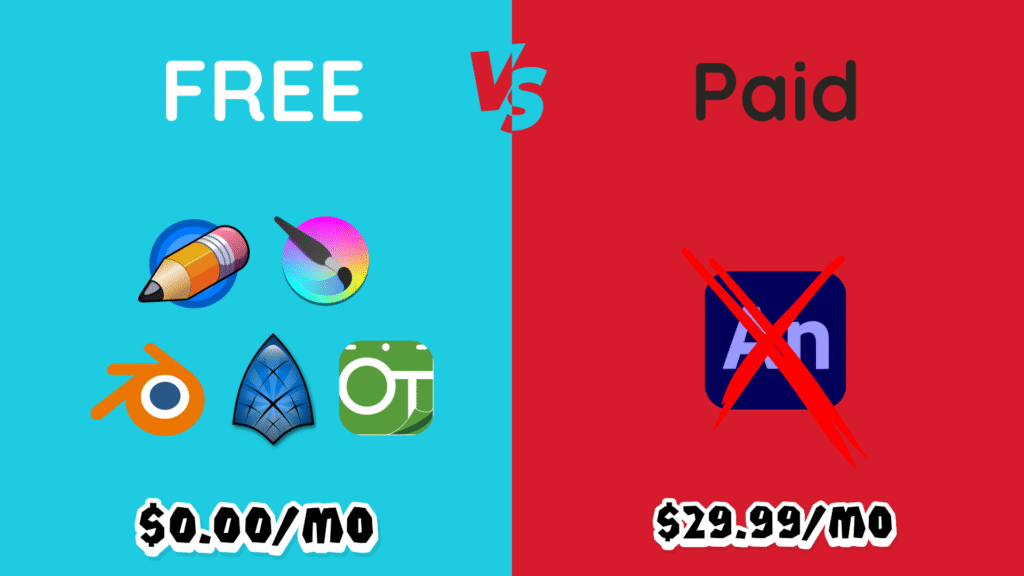
Are you tired of expensive subscriptions for animation software that just doesn’t deliver? Adobe Animate has long been the “industry standard” for 2D animation, but its hefty price tag and increasing limitations are driving artists to seek alternatives. What if we told you there are powerful, professional-grade animation tools available for absolutely FREE that can actually outperform Adobe Animate in key areas?
At TechnologyMunch, we’ve scoured the digital landscape to bring you 5 (yes, FIVE!) essential free animation tools that are ready to revolutionize your workflow and save you hundreds of dollars a year. Whether you’re a beginner, a digital painter, or a pro aiming for high-end 3D VFX, prepare to meet your new favorite animation software.
Let’s dive in!
1. Blender: The 3D & VFX Powerhouse (And Your New 2D Friend)
- Why it Beats Animate: Adobe Animate lives in a 2D world. Blender? It’s an entire universe. This is a full-fledged 3D modeling, sculpting, rendering, and VFX studio, but its secret weapon for 2D artists is Grease Pencil. Imagine drawing your 2D characters and backgrounds directly in a 3D space, then animating a cinematic camera through them, adding dynamic lighting, and even particle effects. Animate simply cannot compete with this level of creative freedom and professional integration.
- Best For: Advanced users, 3D animators, VFX artists, those wanting a 2D/3D hybrid workflow, and serious hobbyists ready for a steep but rewarding learning curve.
- The Reality Check: Blender has an overwhelming interface designed for professionals. Expect a steep learning curve and high hardware demands for 3D rendering
2. OpenToonz: The Studio Ghibli Pipeline (For Serious 2D Production)
- Why it Beats Animate: Ever wondered how Studio Ghibli creates those breathtaking, hand-drawn animations? They use a customized version of OpenToonz. This isn’t just a drawing program; it’s a complete production pipeline tool designed for feature film-level 2D animation. Its “Xsheet” (Exposure Sheet) provides unparalleled control over frame timing, layers, and effects, a far cry from Animate’s simpler timeline. For traditional paper animators, its advanced GTS scanning and cleanup tools are simply unmatched.
- Best For: Traditional animators, production studios, those needing advanced paper-to-digital workflows, and artists focused on detailed frame-by-frame character animation.
- The Reality Check: OpenToonz has a very steep learning curve due to its professional, dense interface. It can also be prone to bugs and crashes, requiring patience from users.
3. Synfig Studio: The Efficiency Machine (Master of Automated Tweening)
- Why it Beats Animate: If you dread the tedious task of drawing every single “in-between” frame, Synfig Studio is your new best friend. It’s the Efficiency Machine, specializing in vector tweening and a powerful bone-rigging system that automates character animation. Instead of manually defining every shape morph like in Animate, you set a few keyframes, move a bone, and Synfig calculates the smooth motion for you. This saves monumental amounts of time for cut-out animation and motion graphics.
- Best For: Animators focused on cut-out animation, motion graphics, character rigging, and those prioritizing automated efficiency over hand-drawn frame-by-frame.
- The Reality Check: Synfig has a smaller community and fewer tutorials, making the node-based interface a steep learning challenge. Updates are less frequent, which can lead to occasional instability and slow rendering times.
4. Krita: The Visual Master (World-Class Brushes for Animation)
- Why it Beats Animate: For artists who prioritize the look and feel of their brushwork, Krita is the undisputed champion. This is a world-class digital painting application first, boasting an incredible, highly customizable brush engine. If you want your animation to have the rich textures of watercolor, oils, or traditional dry media—something impossible with Animate’s basic vector brushes—Krita is your go-to. Its seamlessly integrated animation timeline and onion skinning make painting frame-by-frame a joy.
- Best For: Digital painters, concept artists, illustrators, and animators seeking high artistic fidelity and unique, textured aesthetics for their hand-drawn animation.
- The Reality Check: Krita is primarily raster-based, meaning scaling up finished artwork can lead to pixelation. Its animation tools are basic, lacking advanced features like rigging or automated tweening.
5. Pencil2D: The Beginner Champion (Simple & Pure Fundamentals)
- Why it Beats Animate: When you just want to learn the core principles of animation without being overwhelmed by complex features or expensive software, Pencil2D is the ultimate starting point. It’s a minimalist, distraction-free digital sketchbook designed purely for hand-drawn frame-by-frame animation. It wins over Animate for beginners because it forces you to focus on timing, spacing, squash, and stretch—the absolute fundamentals—without any intimidating bells and whistles.
- Best For: Absolute beginners, students learning the 12 principles of animation, and artists who prefer a simple, clean interface for basic hand-drawn animation.
- The Reality Check: Pencil2D is extremely basic. It lacks advanced features like rigging, sound support, or complex effects, meaning you will quickly outgrow it as your skills develop.
The Final Verdict: Stop Paying, Start Creating!
There you have it! Five incredibly powerful and completely FREE animation tools that offer distinct advantages over Adobe Animate. Whether you’re looking for 3D power, a professional pipeline, automated efficiency, artistic quality, or just a simple starting point, these $0$ solutions prove that creativity doesn’t have to break the bank.

Abdullah Zulfiqar writes about technology in a simple, practical way, helping readers stay updated and make smarter decisions in an ever-evolving digital world.